
Product feeds for marketplaces, search and ads for Shop-Script
One catalog, more places where shoppers find you


Product feeds for Shop-ScriptOne catalog - more places where shoppers meet your products.
Don't wait for shoppers to find your website first. The plugin sends your Shop-Script products to where people already search and compare: Google and Yandex search, shopping ads, marketplaces and classifieds. Price, stock and descriptions stay in your store - the plugin builds each platform's feed from them and checks it before publishing.
- Your products show up where shoppers already choose, not only on your site
- Search, ads, marketplaces and classifieds - all from one catalog
- The feed price matches your storefront, or the new file is not published
- Before sending, you see how many products go out, how many don't, and why
- A failed build never leaves your store without a feed
Whether a product is accepted and shown is up to each platform.
Four ways to meet a buyer - from one catalog
A shopper doesn't have to find your store first. They search for a product, browse a marketplace or scroll past an ad - and if your offer is there, they discover your store through the product.
Search, without an ad budget
Google's free product listings appear in Search, Images, Lens and YouTube. Yandex, Russia's largest search engine, builds its product answers partly from feeds, according to Yandex Webmaster.
 Google
 Lens
 YouTube
 Yandex Products
AI assistants
Google shows product listings in Gemini too, and Microsoft in shopping with Copilot. Both take the product data from their merchant centers.
 Gemini
 Copilot
 Bing
Shopping ads
Google, Meta, TikTok and Criteo use the whole catalog to assemble product ads themselves. Yandex Direct does the same, as its help center describes.
 Google Ads
 Microsoft
 Meta
 TikTok

 Yandex Direct
Marketplaces and classifieds
Platforms with demand of their own across Russia, Kazakhstan and Ukraine. On Yandex Market with the DBS model, stock and delivery stay with you.
 Yandex Market
 Ozon
 Avito
 Kaspi.kz
 Rozetka
 Prom.ua
 monomarket
Not every channel has to bring sales. But your whole range no longer depends on a single way of being found.
Shoppers now find products through AI assistants too
Google Merchant Center Help lists Gemini among the places where free product listings appear, and in May 2026 Google announced dedicated visibility insights for products in AI Mode and Gemini. Microsoft Advertising states that a product's path into shopping with Copilot starts with a correct product feed in Microsoft Merchant Center.
The takeaway is simple: a product page is no longer read by people alone. Price, stock, brand and attributes from the feed are what a machine uses to understand your product and compare it with others.
And Yandex with Alice AI? For Yandex search product answers, the plugin builds the Yandex Products feed. To make the product page itself clear to search engines and AI - including Alice, Russia's leading AI assistant - our line has a separate Schema.org markup plugin. The two complement each other.
Being shown is never guaranteed: each system decides for itself. The plugin makes sure the data matches your storefront and passes checks before it goes out.
From Yandex Search and the Alice AI chat straight to an order
Yandex Products no longer just shows your product - it sells it. Products from the feed get a "Buy" button in Search, in the Products section and in the Alice AI chat. The shopper checks out right where they chose the product, and their name, phone and address are filled in from Yandex ID. According to Yandex Products Help, this shorter path can reduce drop-offs.
In the Premium edition, the plugin connects this button to your store over the YCP standard (Yandex Commerce Protocol). The order lands in Shop-Script like any other - with the customer, delivery and payment method - and the plugin checks price and stock before payment. Yandex offers no ready-made module for Shop-Script: here it is built into the same Yandex Products feed the plugin already builds.
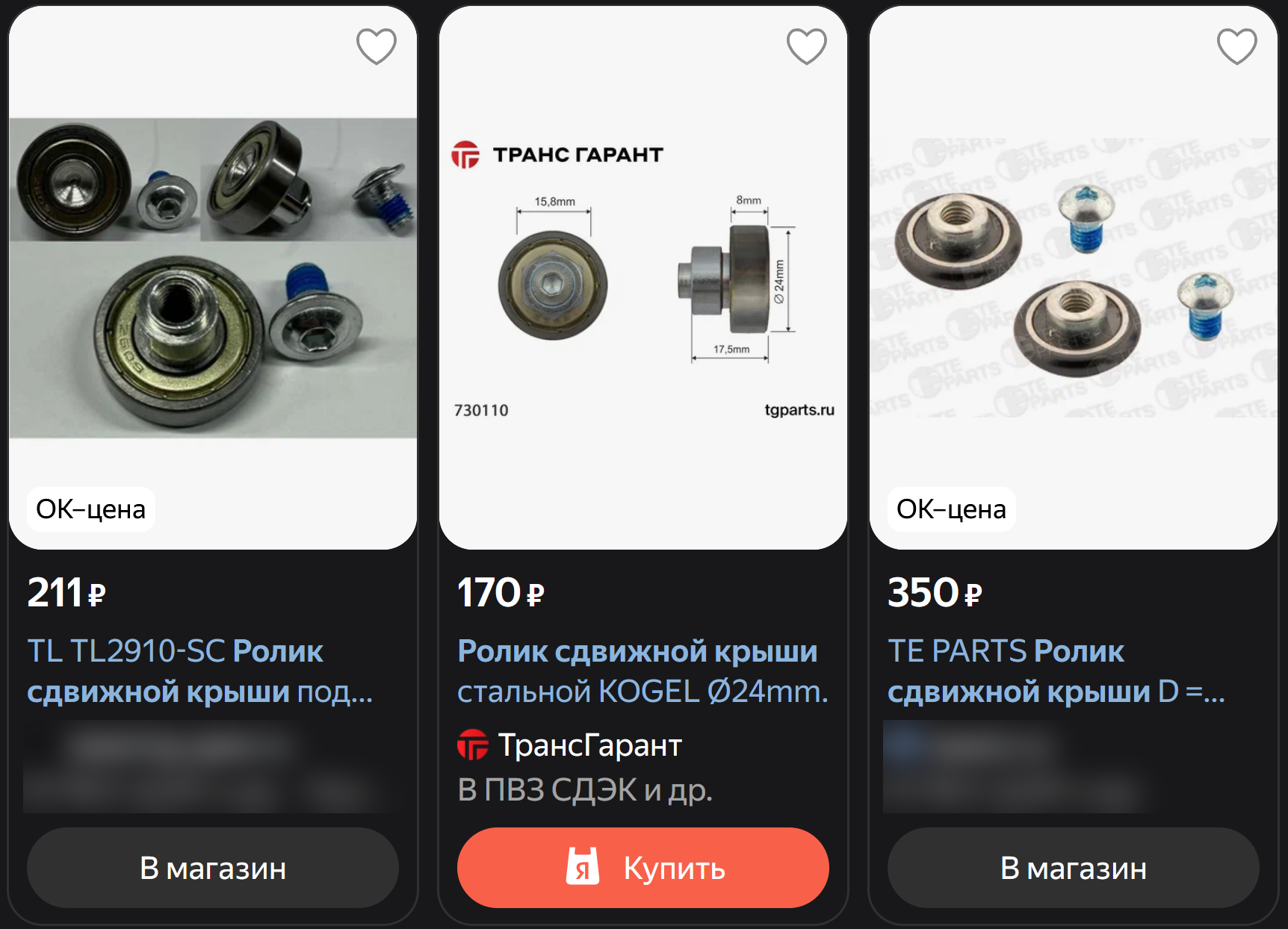
The live Products section of Yandex Search: the Shop-Script store running this plugin gets the "Buy" button, its neighbors only "To the store". Other store names are hidden.
Where and when the button appears is up to Yandex: it is in testing now and not shown to every user or for every product.
A new platform is not a second product database
Every platform wants products in its own shape. Maintain those shapes by hand, and each new platform becomes one more copy of your catalog to keep in sync.
A catalog copy per platform
- You change a price on the site.
- You edit the ad catalog, then a marketplace, then another one.
- One place gets forgotten.
→ somewhere a shopper sees an old price or an item you no longer have
One catalog in Shop-Script
- You change the product in your store.
- On schedule, the plugin builds a feed for each platform and checks it.
- Platforms pick up their files at their own pace.
→ every platform gets the same data
Today that is 16 feed types for 14 platforms. Where a platform splits the data itself, there are two files: products and placement terms for Yandex Market DBS, assortment and offers for monomarket. You don't need to study each platform's file requirements: the plugin builds a feed for every supported platform.
The feed price matches your storefront - or the new file stays unpublished
This is not our nitpicking. Google Merchant Center Help names a price mismatch between the feed and the product page as a reason a product gets disapproved.
A storefront price is built from promotions, rounding and add-ons your store set up for itself. The plugin does not recompute someone else's formula - it checks whether what goes out matches what the shopper sees.
- It matches - the feed is published.
- It can't be confirmed - the new file is not published, and the platform keeps receiving the previous working one.
- A large catalog is built in parts and published only as a whole: until every part is ready, the previous feed is served.
- A build fails - your store is not left without a feed.
A broken feed usually shows itself at once. A feed with an outdated price can keep working - and be found out later. So the plugin doesn't promise to guess any price; it promises not to publish an unproven one.
The price is checked beyond the feed. Search engines look at the product page itself too. Yandex Products Help says that data from a page's structured markup gets top priority over data from other sources when the robot crawls it, and the Yandex Products merchant account checks the markup of your product pages every day. Google, as Merchant Center Help states, crawls your store itself and picks up price changes. So the price in the feed has to match the page markup as well.
Our Schema.org Markup plugin puts that markup in place: JSON-LD on the product page with every field Yandex Products and Google Merchant Center require - name, brand, image, availability, price and currency. The price in the markup is the one the shopper sees on your storefront.
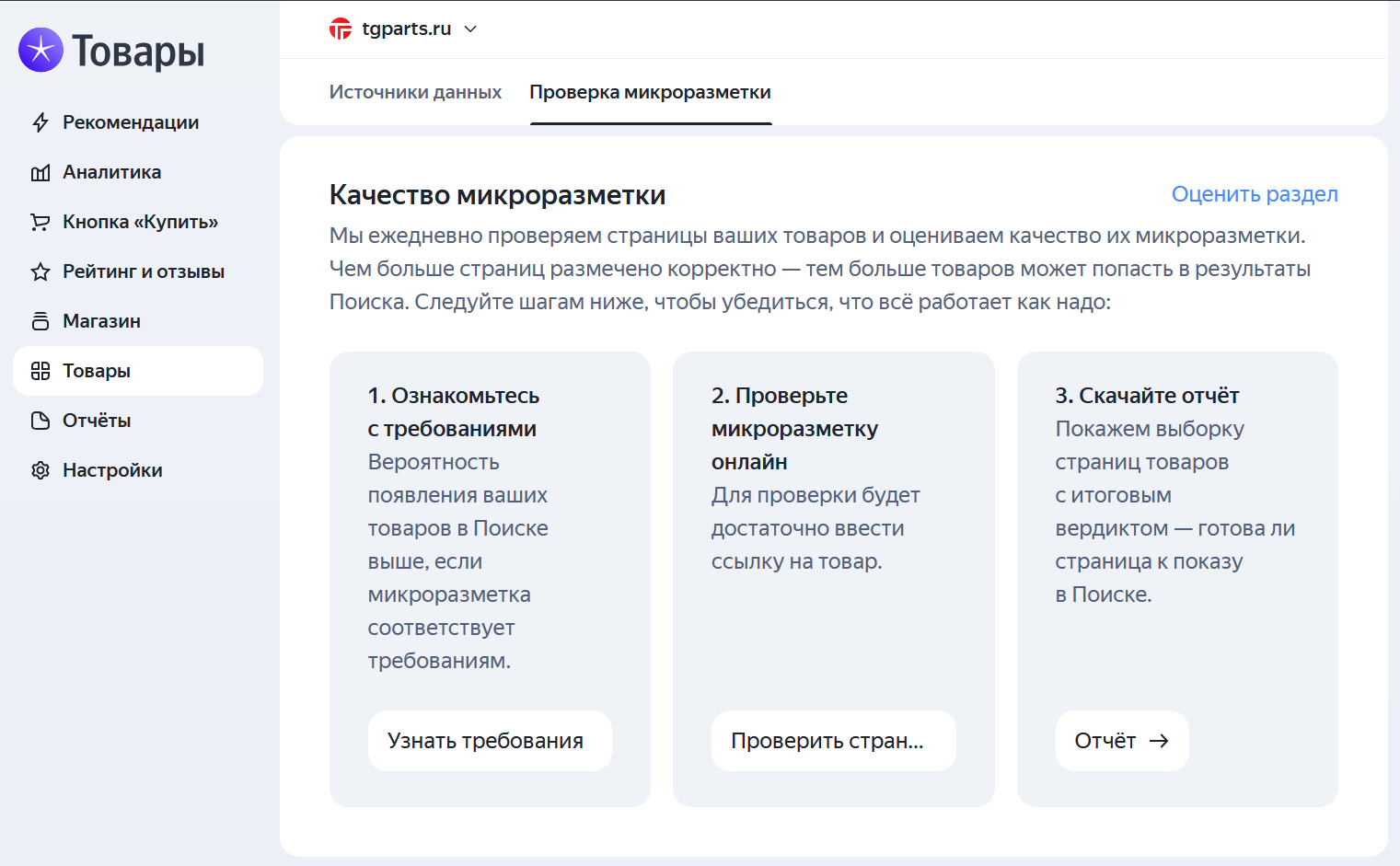
The Yandex Products merchant account: product pages are checked daily: the more pages are marked up correctly, the more products can make it into Search.
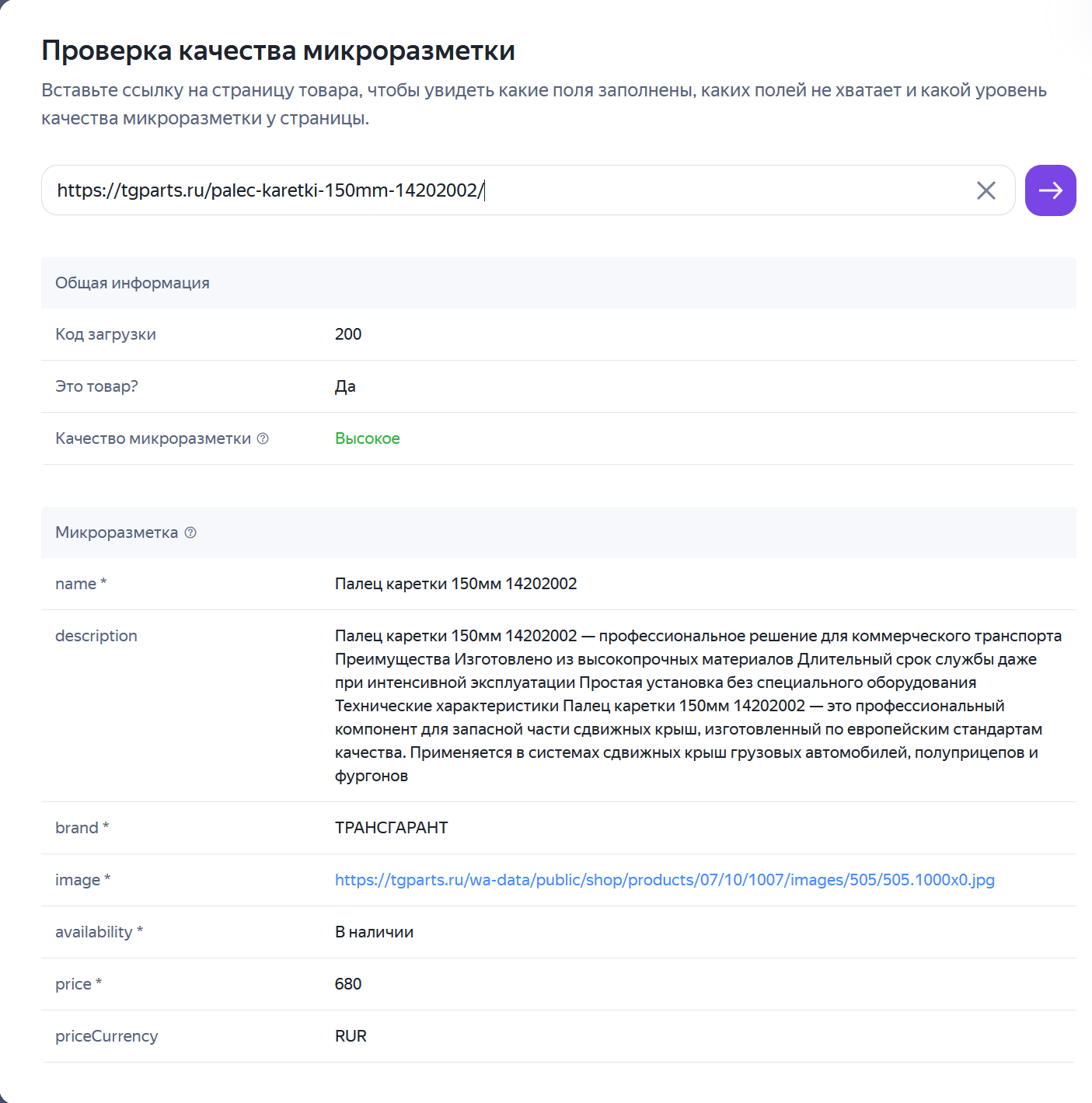
The markup check in the Yandex Products merchant account: a store page running our plugin scores "High" quality, every required field filled in.
What goes out, what doesn't and why - before sending
Before sending, the plugin shows a breakdown of the run: how many products go out, how many don't, and for what reason. Some of the reasons a platform would reject a product are visible right here - not after impressions have dropped.
Product left out of the file
The reason is exact, because we made the decision: a required field is empty, the price could not be confirmed, the product is hidden in the store.
Product in the file, but may not qualify
We don't pretend to know the platform's verdict. We name what is missing - and the platform decides.
The plugin screen shows how each build ended, what is being published now and why a build failed. Any other reasons are shown by the platform in its own dashboard.
Already exporting products? Switching starts by reading, not by setting up again
The plugin finds the profiles of the bundled Shop-Script YML export and of two popular export plugins for Yandex and Google, and shows what it can carry over.
- Whatever can be expressed is carried over. Whatever can't is named, not silently substituted.
- The old profile stays in place: a working channel is never switched off blindly.
- A selection that could not be carried over never turns into "the whole catalog".
Start with search and ads, add marketplaces when you need them
Every field a platform requires is available in both editions. They differ in platforms, number of storefronts and how complete the field set is.
Base one storefront
Google and the platforms that share its format, plus Yandex Products.
- Google
- Microsoft
- Meta
- Yandex Products
- Every field these platforms require
Premium all platforms
Everything in Base plus the other nine platforms.
- TikTok
- Yandex Market
- Yandex Direct
- Ozon
- Avito
- Kaspi.kz
- Rozetka
- Prom.ua
- monomarket
- The Yandex "Buy" button in Search and Alice AI, orders into Shop-Script
- Several storefronts
- The full field set, optional fields included
Optional for a platform means "we'll accept it without", not "the seller doesn't need it": a product without a picture and description gets accepted, but it will not compare in your favor.
What the platform decides, not the plugin
Sent doesn't mean accepted, and accepted doesn't mean shown. Approval, placement, reach and sales are up to the platform; Google itself states that a feed does not guarantee a product will be shown.
The plugin sends data from your store to the platforms. Orders and sales on those platforms do not flow back: stock is managed in Shop-Script. The exception is orders placed with the Yandex "Buy" button: they arrive in Shop-Script.
Selling services? There is a separate plugin for them
This export works with Shop-Script products. Services have a separate plugin for the Site app: it builds a ready service price list from your Webasyst site catalog for your company card in Yandex Business.

The feed covers the platforms, the line covers the product page
The feed hands your products to the platforms. To make the product page itself clear to search engines and AI assistants, and to let search engines learn about a new price faster, the KakTak.Net line has dedicated plugins.


You manage a product once - and shoppers meet it in search, in ads and on the platforms where they already choose.
Need just one platform? Each one has a plugin of its own
Everything this plugin does is also sold separately - one plugin per platform or channel.
 Google Merchant CenterYour products on Google and four more platforms
→
Yandex ProductsFresh prices and availability on Yandex
→
Yandex DirectProduct ads across your whole catalog
→
Yandex MarketSell from your own warehouse under DBS
→
OzonPrices and stock from your store
→
AvitoListings from your store catalog
→
Kaspi.kzA price list with price and availability
→
RozetkaA price list from your own store
→
Prom.uaA catalog at a permanent URL
→
monomarketCatalog and price list from your store
→
KakTak.Net
-

-

AI assistant reads as the truth about your product
$18.99$1297 days free
-

Your store automatically notifies Search engines
$18.99$997 days free
-

AI agents are reshaping shopping. A clean llms.txt
$18.99$1297 days free
-

-

-

-

-

-

AI assistant reads as the truth about your product
Free -

-

-

Link card with photo, price and contacts
$18.99$497 days free
-

llms.txt blog map for AI assistants and search
$18.99$497 days free
-

Your site automatically notifies Search engines
Free -

-

Schema.org markup: posts in search and AI
$18.99$497 days free
-

-

llms.txt - community map for AI assistants
$18.99$33.997 days free
-

Schema.org markup: discussions in search & AI
$18.99$33.997 days free
-

Rich topic previews in Telegram and social
$18.99$33.997 days free
-

Portfolio and work map for AI - llms.txt
$18.99$33.997 days free
-

llms.txt - knowledge base & FAQ map for AI
$18.99$32.997 days free
-

Schema.org markup: photos in search & AI
$18.99$32.997 days free
-

Schema.org markup: FAQ in search and AI
$18.99$33.997 days free
-

Beautiful FAQ preview cards in chats and socials
$18.99$32.997 days free
-

Album and photo link previews in messengers
$18.99$32.997 days free
-

A service price list for your Yandex card
$9.99$1697 days free
-

One catalog for Google and four more platforms
$79$1997 days free
-


